

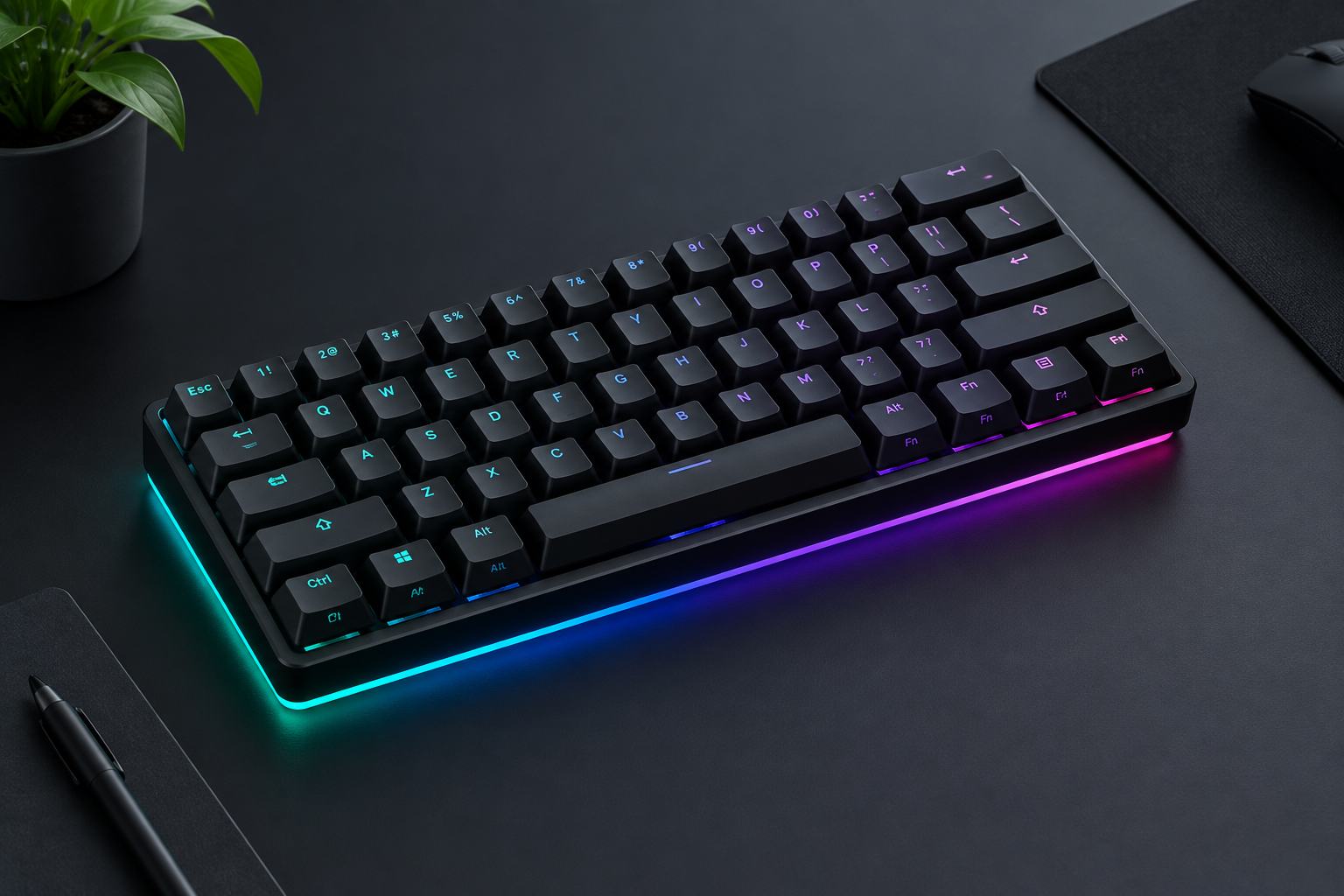
The Wooting 60HE is still the 60% keyboard we would hand to any CS2 or Valorant player who wants faster movement. Its Hall effect Lekker switches let you set actuation anywhere from 0.1mm to 4.0mm and reset keys the moment you lift them. The 60HE v2 keeps that formula and that compact layout, and it rebuilds the board around a swappable module.
Wooting 60HE specs that matter
Wooting is a Dutch company, and the name of its switch says so: “lekker” is Dutch slang for nice or tasty. The original Wooting 60HE launched in 2022 at $174.99 and quickly became the reference point for every rapid trigger keyboard that followed.
| Spec | Original Wooting 60HE |
|---|---|
| Layout | 60%, 61 keys |
| Switches | Lekker L60 linear, Hall effect (magnetic) |
| Total travel | 4.0mm |
| Actuation range | 0.1mm to 4.0mm, in 0.1mm steps |
| Rapid Trigger | Yes, down to 0.1mm sensitivity |
| Analog input | Yes, including gamepad emulation |
| Connection | Wired, detachable USB-C |
| Case | Plastic |
| Software | Wootility (browser or desktop app) |
| Launch price | $174.99 (2022) |
The spec sheet hides the real selling point. Every key reports how far down it is, all the time. That analog data is what makes the rest of the feature set possible.
Why Rapid Trigger wins gunfights
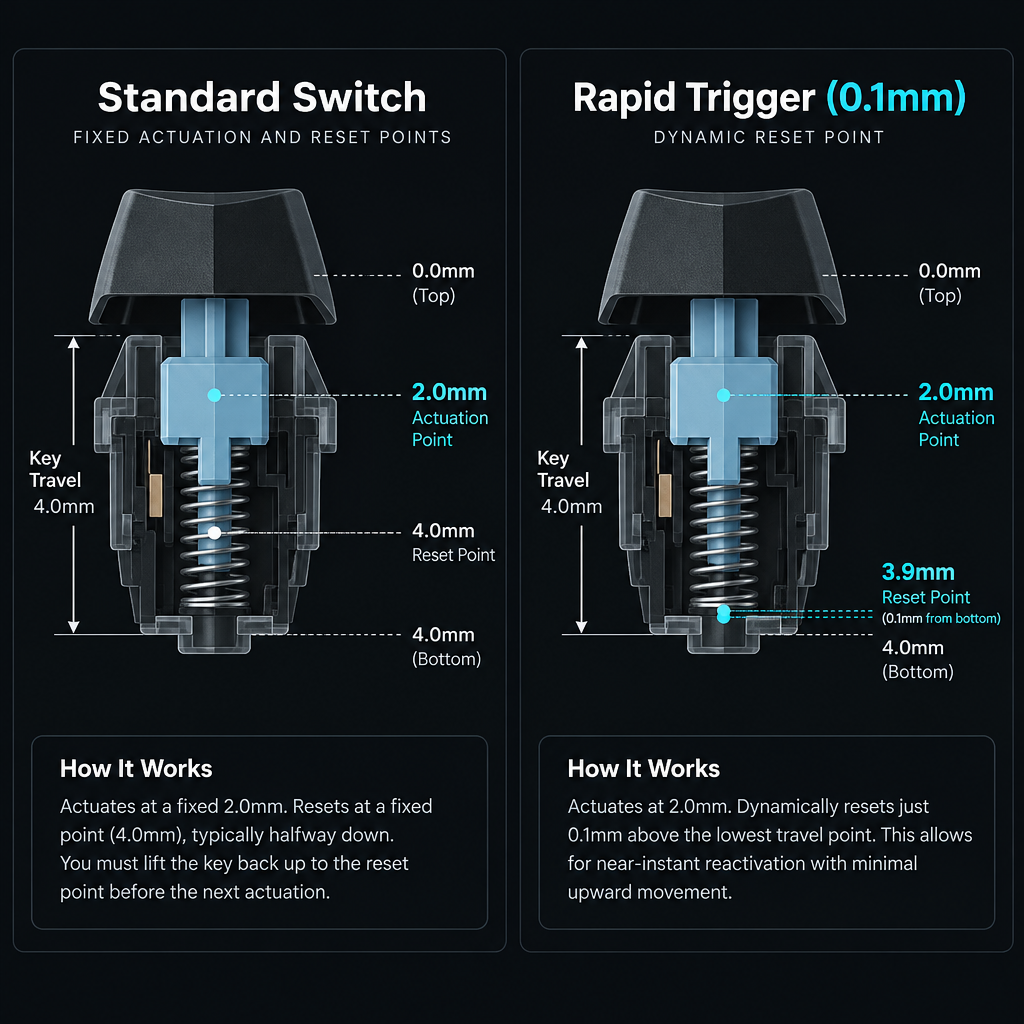
A typical mechanical switch like a Cherry MX Red actuates at 2.0mm and has to travel back past a fixed reset point before it registers as released. Your finger is already coming up, but the game still thinks you are holding A.
Rapid Trigger throws out the fixed reset point. With sensitivity at 0.1mm, the key releases after it moves up 0.1mm from its lowest point, and it re-presses after it moves down 0.1mm. In CS2 and Valorant, you are only accurate once your movement speed drops low enough. Releasing a strafe key sooner means you stop sooner and your first shot lands sooner.
That is the whole case for the product. Players do not gain aim from a keyboard. What they gain is cleaner counter-strafes and tighter jiggle peeks, and those show up every round.
Shotcaller's note
Mechanical boards reset at a fixed point, roughly halfway down a 4.0mm switch. A 0.1mm Rapid Trigger setting lets the key reset after a movement about one-twentieth that size. That gap is where faster counter-strafes come from.
Our experience with the Wooting 60HE
The Lekker L60 feels like a smooth, light linear. Nothing about the press feels gimmicky. Out of the box, the board’s biggest weakness is acoustics. The plastic case sounds hollow next to the aluminum boards that now sell at similar prices. Stabilizers on the bigger keys are serviceable rather than great.
The 60% layout is the right call for gaming. You get more room for big mouse swipes, and the board sits angled under your left hand without forcing your wrist out wide. You lose arrows, F-row and nav keys to a function layer. That is fine for ranked, but it is annoying for spreadsheets. If you type for a living, budget time to learn the Fn layer or look at a larger board.
Software is where Wooting has always been strongest. Wootility runs in the browser and pushes firmware updates that have added real features to boards users already owned. Few companies in gaming hardware support old products this way. That track record matters more than any marketing claim.
Wootility features worth using
- Rapid Trigger: per-key, with separate press and release sensitivity.
- Dynamic Keystroke (DKS): up to four actions on one key, depending on how deep you press and release.
- Mod Tap: one action on tap, another on hold.
- Toggle Key: switches between a held and a toggled action.
- Snappy Tappy and Rappy Snappy: when two opposing keys are held, the most recent (or deeper) one wins.
- Analog mode: the board can act as a gamepad, so you get variable walk speed in games that support it.
- App Linking: Wootility 5.4 added profiles that switch automatically based on the app you have open, plus presets for the Advanced Keys above.
Heads up
In August 2024, Valve announced it would kick players on official CS2 servers if they use hardware SOCD features that automate inputs, such as Snappy Tappy. Keep it off in your CS2 profile. Check each game’s rules before enabling it elsewhere.
That ban is a real shift for anyone coming from Counter-Strike: Global Offensive. Back then, null binds were a grey area. Now Valve treats them as automation. Rapid Trigger on its own is allowed. It still requires you to release the key yourself.
Settings we run on the 60HE
Quick steps: set up a ranked profile in Wootility
- Open Wootility and create a new profile.
- Select W, A, S, D and set actuation to 0.5mm.
- Enable Rapid Trigger at 0.15mm.
- Set every other key to 1.5mm.
- Save the profile to the keyboard’s onboard memory.
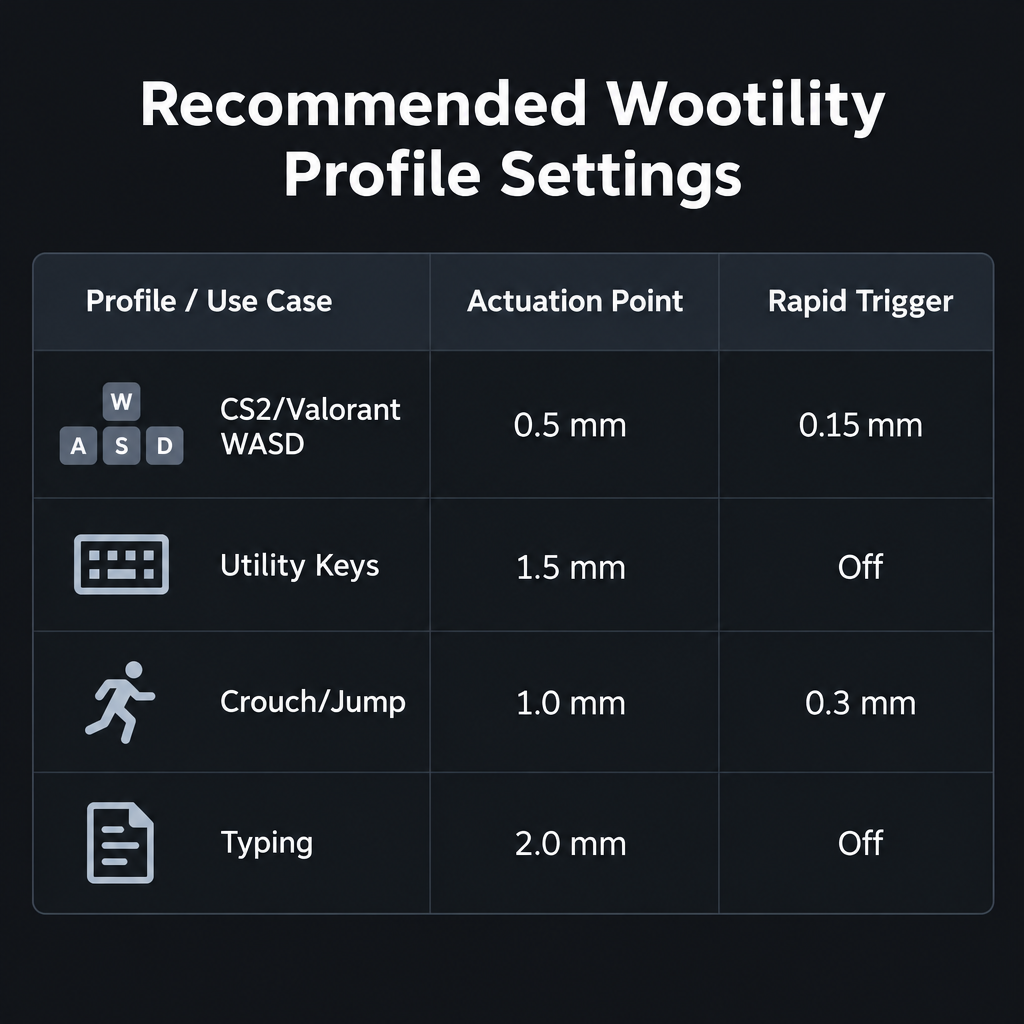
| Profile | Actuation | Rapid Trigger | Why |
|---|---|---|---|
| CS2 / Valorant movement (WASD) | 0.4 to 0.6mm | 0.1 to 0.2mm | Fastest stops, but not so twitchy that resting fingers walk you |
| Utility and abilities | 1.2 to 1.8mm | Off | Prevents accidental nade or ability casts |
| Crouch / jump | 1.0mm | Optional 0.3mm | Fast crouch-peeks without misfires |
| Typing | 2.0mm | Off | Feels like a normal keyboard, fewer typos |
Start at 0.15mm Rapid Trigger, not 0.1mm. At 0.1mm, a slight finger tremor can register as a re-press. Most players get every useful millisecond at 0.15mm. Once your movement is clean, the next fix is usually visual. Our guide to the best Valorant crosshair covers that side.
Wooting 60HE vs 60HE+: what changed
The 60HE+ is a 2023 refresh of the original 60HE, with an updated PCBA, improved internal components and better sound dampening. Layout, switches and feel stayed the same. The upgrade mostly brought refinements inside the case. If you own an original 60HE and are happy, the plus model alone is no reason to rebuy.
Wooting also sells the 60HE+ Module. It is the guts of the keyboard without the case, aimed at players who want to drop it into an aftermarket shell.
Wooting 60HE v2: what actually changed
The v2 is Wooting’s answer to the 60HE’s two big complaints: the plastic case and the stock sound. It is designed around a separable module. That module is the PCB, plate and switches as one unit, and it sits in a base case. You can buy the 60HE v2 Module on its own and pair it with cases such as the Optimum Case, which turns the 60HE into something closer to an enthusiast build.
It also brings the 60% board in line with the platform Wooting launched with the 80HE in 2024. That board shipped with an aluminum case, Lekker V2 switches and 8000Hz polling. The 60HE v2 keeps the 60% layout, the Wootility feature set and the Rapid Trigger behaviour that made the original popular.
Heads up
Wooting revises polling, switch versions and bundled accessories between production runs and firmware updates. Confirm the exact v2 spec, warranty terms and shipping region on the product page at order time.
Where the 60HE fits in the Wooting lineup
| Model | Layout | Who it’s for |
|---|---|---|
| Wooting Two HE | Full-size | Players who want a numpad and analog keys |
| Wooting 60HE / 60HE+ | 60% | Budget-conscious FPS players, used market |
| Wooting 60HE v2 / Module | 60% | New buyers who want the compact board with a better build |
| Wooting 80HE / 80HE+ | 80% with F-row | Players who want arrows and an F-row without a numpad |
| Wooting UwU | Small keypad | Rhythm games like osu! |
Our position is simple. For ranked FPS, the 60% layout is the better gaming shape. The 80HE suits you if you also work on the same desk. Pair either with a light mouse and you are covered for tactical shooters and hero shooters with fast strafes. That includes many Overwatch characters who reward tight ADAD movement.
Is the Wooting 60HE worth it?
A used or discounted original 60HE is still one of the best value buys in competitive gaming. Its switches and software do the job that matters. If you are buying new, get the v2. The module design and better case fix the weak points of the original without touching what made it good.
Skip it if you mostly play MOBAs. League players gain very little from Rapid Trigger. If you are spending money to climb with an OP jungle pick, a better mouse and monitor will do more.
FAQ
Is the Wooting 60HE good for Valorant?
Yes. Rapid Trigger on your movement keys makes counter-strafing faster, and Valorant rewards accurate first shots after you stop. It is legal to use. Riot does not ban adjustable actuation or Rapid Trigger.
What is the difference between the Wooting 60HE+ and the 60HE v2?
The 60HE+ is a refresh of the original design with an updated PCBA and better sound dampening. The v2 is a reworked board built around a removable module that sits in a base case. That design opens up better cases and a more refined build.
Can I use Snappy Tappy in CS2?
Not on official servers. Since August 2024, Valve kicks players who use hardware SOCD automation such as Snappy Tappy. Turn it off in your CS2 profile.
Can I change the switches on the Wooting 60HE?
Yes. The board is hot-swappable, but only for compatible magnetic Hall effect switches. Regular mechanical switches will not work, because the board reads magnet position, not a contact.
Do I need Wootility running all the time?
No. Settings save to the keyboard’s onboard profiles, so the board keeps working without the software open. You only need Wootility to change settings or update firmware.