

By Nina Castelli Fact-checked by Desmond Ayodele Published
More than 4 in 10 tracked Valorant pros and over a third of tracked CS2 pros play on a Wooting, and no other keyboard brand comes close in either game. As of November 2026, most competitive FPS players should buy the Wooting 80HE+ ABS at $199.99 or the 60HE v2 ABS at $179.99. If you want the zinc 80HE+, it won’t ship until March 2027, so plan around that before you order.
Callouts
- The 80HE+ (TKL) launched in September 2026 at $199.99 ABS, $289.99 zinc and $149.99 as a module.
- The previous generation (60HE+ and original 80HE) is the value pick, because Wooting cuts old models’ prices for good when a successor launches.
- Wooting keyboards bought new carry a 4-year warranty, and Wooting aims to keep updating discontinued models in software for four more years.
- In CS2, Snappy Tappy and Rappy Snappy will get you kicked from matches. Rapid trigger is allowed.
- ProSettings tracks Wooting at 37.14% of CS2 pros and 43.71% of Valorant pros as of November 2026.
Fact-checked
We checked these key facts against the sources named, on November 26, 2026:
- The ABS prebuilt costs the same $199.99 as the original’s launch price, so the upgrade costs you nothing extra (source: notebookcheck.net)
- As of November 2026, most competitive FPS players should buy the Wooting 80HE+ ABS at $199.99 or the 60HE v2 ABS at $179.99 (source: wooting.io)
- As of November 2026, ProSettings tracks it at 37.14% of 964 CS2 pros and 43.71% of 707 Valorant pros, with Razer second in both games (source: prosettings.net)
- Wooting is the most-used keyboard brand among tracked pros, at 37.14% in CS2 and 43.71% in Valorant according to ProSettings in November 2026, and the 80HE+ is its current all-round TKL at $199.99 (source: wooting.io)
Best Wooting keyboard in November 2026: the short answer
Buy the 80HE+ ABS if you want one keyboard for gaming and work. Buy the 60HE v2 if you play low-sensitivity FPS and need room for your mouse. Buy a reduced-price 60HE+ or original 80HE if you want Wooting performance for less.
The picks are based on four things, in this order: layout fit for the games you play, verified US price, review verdicts from RTINGS, PC Gamer and Notebookcheck, and what pros use according to ProSettings. Raw specs count for the least, because every current Wooting already has rapid trigger and adjustable actuation.
| Use case | Pick | Why | Price (US) | Check price at |
|---|---|---|---|---|
| CS2, all-round gaming plus work | Wooting 80HE+ ABS | Full F-row and arrow keys, Tikken Medium switches, true 8kHz | $199.99 | wooting.io (not yet at MK) |
| Valorant, low sensitivity, small desk | Wooting 60HE v2 ABS | 60% layout frees mouse space, true 8kHz, Tachyon mode | $179.99 direct, from $189.99 at MK | wooting.io, MechanicalKeyboards.com |
| Premium desk build | Wooting 60HE v2 aluminum | Same internals in a heavier case | $239.99 | wooting.io |
| Tight budget, still Wooting | Wooting 60HE+ | Permanently reduced after the v2 launched | $189.99 at MK (Wooting direct is lower) | wooting.io, MechanicalKeyboards.com |
| Numpad, MMO, spreadsheets | Wooting Two HE | The only full-size Wooting | $194.99 direct, $204.99 at MK | wooting.io, MechanicalKeyboards.com |
| Custom case owners | 80HE+ or 60HE v2 module | You get the PCB without a case | $149.99 (80HE+), $149.99 at MK (60HE v2) | wooting.io, MechanicalKeyboards.com |
| Extra analog keys next to a main board | Wooting UwU | Three analog keys plus three digital keys | From $44.99 at MK | wooting.io, MechanicalKeyboards.com |
Best overall: 80HE+
The 80HE+ is the safest Wooting to buy in 2026. It keeps the tenkeyless layout that made the original Wooting 80HE the default pick for reviewers, and adds Lekker Tikken Medium switches and an FR4 plate. The ABS prebuilt costs the same $199.99 as the original’s launch price, so the upgrade costs you nothing extra.
Best for Valorant and low-sens players: 60HE v2
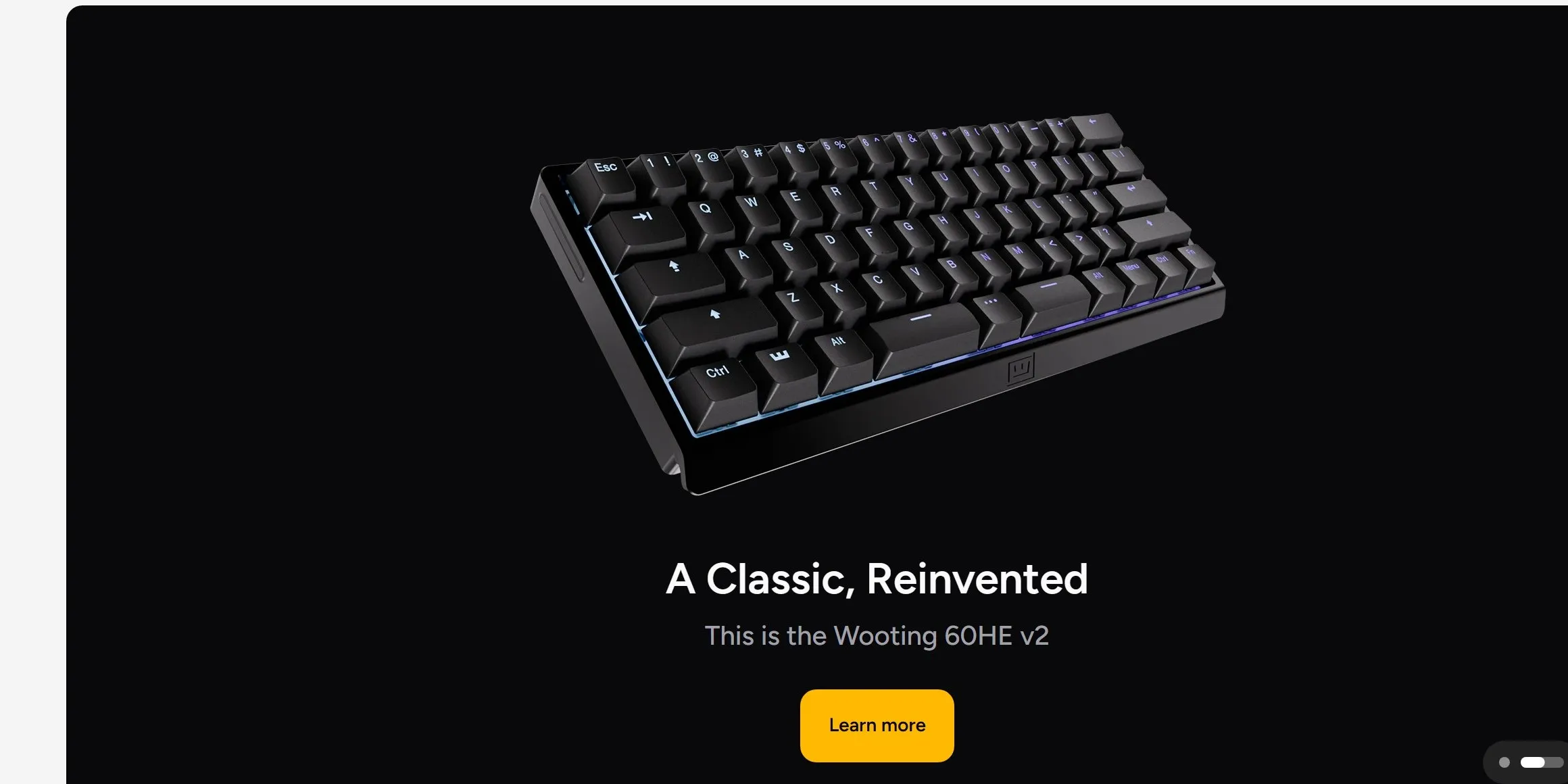
If you swing your arm across a large mousepad at 20 to 30 cm/360, every centimeter of desk counts, and a 60% board gives you that space back. Wooting unveiled the 60HE v2 on December 2, 2025. Its main upgrade over the 60HE+ is true 8kHz polling.
Best value: 60HE+ or 80HE at reduced prices
Wooting doesn’t run seasonal sales. Its November 23, 2026 Black Friday post says it is skipping Black Friday entirely, and that it permanently lowers the price of the previous model when a new one launches. The 60HE+ (after the 60HE v2) and the original 80HE (after the 80HE+) both got that treatment. Both still have what matters in ranked play: rapid trigger, per-key actuation and analog input.
Who shouldn’t buy a Wooting
Skip Wooting if you mainly type, want wireless, or want a soft, deep tactile bump. Every Wooting is a wired linear board tuned for games. If you play mostly MOBAs or strategy games, rapid trigger does little for you, and a cheap mechanical board will do the job just as well.
Is a Wooting keyboard worth it?
Yes, if you play tactical shooters seriously and keep a keyboard for years. A Wooting costs more than many Hall-effect rivals, but you get the most-proven software in the category, a 4-year warranty and a stated four years of software support after a model is discontinued.
It is not worth it if your budget is tight or you mainly play games where key reset speed doesn’t matter. In those cases a cheaper Hall-effect board or a regular mechanical board plus a better mousepad gets you more for the same money.
| Reader | Verdict | Why |
|---|---|---|
| First Hall-effect board, plays CS2 or Valorant | Worth it | Rapid trigger and per-key actuation improve counter-strafing right away |
| Owns a 60HE, 60HE+ or 80HE | Not worth upgrading | RTINGS rates the v2 upgrades as modest |
| Budget under $150 | Buy reduced or refurbished | The 60HE+ and Wooting Outlet stock cost less |
| MOBA, MMO or strategy player | Usually not worth it | Rapid trigger matters little outside movement-heavy shooters |
| Wants wireless | No | Every Wooting is wired |
Why are Wooting keyboards so expensive?
You pay for firmware support, polished software and a pricing policy that keeps resale values stable. Nobody claims Wooting has the best raw specs per dollar. For a competitive FPS player who keeps a board for four or five years, $200 works out to about $40 to $50 a year.
The pricing policy is a big part of why. Because Wooting doesn’t run holiday discounts, nobody overpays in October and watches the price fall in November. Its only lasting cuts come when a successor ships.
Support lifespan: what happens after a model is discontinued
Wooting’s Black Friday post makes two commitments. Every keyboard carries a four-year warranty from the day of sale. After a model is discontinued, Wooting aims to keep supporting it in software, new features included, for another four years where the hardware allows, and you can keep using the board after that.
So an original 80HE bought today at the reduced price is still inside a support window that runs years past its retirement. That commitment is the real case for paying Wooting prices over a board from a brand with a short firmware history.
Did you know?
According to Wooting’s November 23, 2026 Black Friday post, the company aims to keep adding software features to discontinued keyboards for up to four years after they leave the store, where the hardware allows.
Software and community
Wooting’s ecosystem goes beyond the keyboard. Wootility v5 handles configuration. The help.wooting.io knowledge base covers setup and troubleshooting. Wooting says its Discord has more than 100K members, and that is where firmware betas and issue reports show up first. The Wooting Analog SDK and RGB SDK are open source on GitHub, which is why game developers and hobbyists can read analog key depth without building their own drivers.
Wooting also sells spare Lekker switches, cases and wrist rests separately, so a worn or damaged part doesn’t mean buying a new board.
Wooting vs cheaper Hall-effect keyboards
In VLR.gg’s “Is Wooting Keyboard worth it?” thread, forum users argue that cheaper alternatives are “90% as good for half the cost”. Some claim boards like the HM80 are “better in every way”. Others call a MadLions model a “Wooting ripoff” that sounds better. One poster defends the SteelSeries Apex Pro after four years of use. Some rivals do sound and feel better out of the box, and several match Wooting on actuation range. Where they usually fall short is software that keeps improving, on-board profiles that work on any PC, analog SDK support, and a published support window.
| Keyboard | Layout | Price (US) | Actuation and features | Software notes |
|---|---|---|---|---|
| Wooting 80HE+ ABS | TKL | $199.99 (Sept 2026 launch) | 0.1 to 4.0 mm, rapid trigger, true 8kHz | Wootility v5 in browser or desktop, on-board profiles |
| SteelSeries Apex Pro TKL Gen 3 | TKL | $189.99 launch MSRP (Sept 2024) | 40 actuation levels, Rapid Trigger, Rapid Tap SOCD | SteelSeries GG, OLED screen |
| IQUNIX EZ63 | 60% with dedicated arrows | $199 Jade, $219 Jade Pro | Hall effect, 8kHz polling | RTINGS notes there is no fully offline client like Wooting’s |
| Razer Huntsman V3 Pro TKL | TKL | $219.99 | 0.1 to 4.0 mm, rapid trigger | Razer Synapse, wrist rest included |
The IQUNIX EZ63 is the most direct rival to the 60HE line. Tom’s Hardware titled its review “Watch out, Wooting?”, and RTINGS rates the two as comparable in overall performance. The EZ63’s slightly non-standard 60% layout keeps dedicated arrow keys, which fixes the 60HE’s biggest weakness for work. It costs about the same as a 60HE v2, though, so it doesn’t save you money.
The Apex Pro TKL Gen 3 is the SteelSeries option for players who want an OLED screen and media controls. Its Rapid Tap is an SOCD feature, so the CS2 rule below applies to it too.
Choose a budget board if price is what matters most. Choose a Wooting if you want software and firmware support you can count on for years.
Wooting vs Razer Huntsman V3 Pro
Razer is Wooting’s closest rival among pros, and the Huntsman V3 Pro costs more. The full size is $249.99, the TKL $219.99 and the Mini $179.99. It uses Razer’s Analog Optical Switches Gen-2 with 0.1 to 4.0 mm actuation and rapid trigger. Tom’s Hardware called the TKL an excellent alternative to the Wooting 60HE, and Windows Central called it “undoubtedly a very expensive keyboard.” The Razer comes with a wrist rest and media controls. The Wooting gives you per-key analog tuning, browser-based configuration and a lower price at each size.
What makes Wooting keyboards special
A Wooting measures how far each key is pressed, not just whether it has passed a fixed contact point. That makes three things possible: you can set the actuation point per key, keys can reset the moment you start lifting (rapid trigger), and keys can send analog, controller-style input. Wooting, founded in 2015 and led by CEO Calder Limmen, built the first mainstream analog keyboards, and nearly every Hall-effect gaming board since has followed the same idea.
Hall effect vs mechanical switches
A mechanical switch closes a metal contact at a fixed depth, usually around 2 mm, and resets at a fixed point on the way up. A Hall-effect switch has a magnet in the stem, and a sensor on the PCB reads its distance continuously. On Lekker switches that range runs from 0.1 mm to 4.0 mm.
In practice, you can set W, A, S and D to fire at 0.4 mm for movement, leave Q and E at 1.5 mm so you don’t cast abilities by accident, and keep typing keys at a normal depth. Because there is no contact to wear out, the actuation point doesn’t drift as the switch ages.
The analog side matters in fewer games, but it does work. Through the Wooting Analog SDK, supported games read partial key presses. Wootility can also make keys act like a controller stick, so pressing W halfway makes your character walk instead of sprint. Racing games and some third-person titles use this best. Tactical shooters ignore it.
Rapid trigger: why it helps you stop and shoot faster
With rapid trigger, a key resets as soon as it starts moving up, with no fixed reset point to pass first. In CS2 and Valorant, accuracy depends on standing still. When you release D to counter-strafe, the game registers the stop a few tenths of a millimeter into the release instead of 1.5 mm or more later. That saves a few milliseconds per strafe. It shows up as cleaner first bullets in peek duels, and it is the main reason pros moved to Hall-effect boards so quickly.
Wooting also offers two SOCD features. Snappy Tappy and Rappy Snappy decide what happens when you hold two opposing keys, such as A and D: the most recent or the deepest press wins. SOCD handling comes from fighting games, where leverless controllers made it standard. In CS2 it is now a rules issue, covered below.
Wootility v5 and the web configurator
Wootility v5 is Wooting’s configuration software, and it runs in a web browser as well as a desktop app. You set actuation, rapid trigger sensitivity, analog curves, Fn layers and RGB, then save everything to on-board profiles. The profiles live on the keyboard, so they work on a tournament PC without installing anything.
That answers a common question from developers about 60% boards: yes, you can program other keys to act as arrow keys. A typical setup puts arrows on Fn plus I, J, K and L, or under the right-hand modifiers on a dedicated layer. It works, but it is still a compromise if you use arrow keys all day.
8kHz polling: what the 0.125 ms number does and doesn’t mean
At 8,000 Hz, the keyboard reports to your PC every 0.125 ms, compared with 1 ms at 1,000 Hz. The 60HE v2 does this in Tachyon mode, and both the 60HE v2 and 80HE+ support true 8K polling. In his Medium review of the 60HE v2, Damian Cooper points out that 0.125 ms is only the USB reporting interval, not a full end-to-end keypress measurement. Total latency also depends on switch travel, scan rate, firmware processing, the game’s tick and input handling, and your display. Treat 8kHz as a small gain on a board that was already fast. Your counter-strafes won’t feel transformed.
Did you know?
The 80HE+’s Lekker Tikken Medium switch starts slightly heavier than the older Lekker L60 V2 (42 gf vs 40 gf) but bottoms out lighter (54 gf vs 60 gf), according to The Desk Brief’s 80HE+ breakdown.
The full Wooting lineup compared
Wooting’s November 2026 lineup has five keyboards and the UwU macropad, plus modules for the 80HE+, 80HE, 60HE v2 and 60HE+. Prices are Wooting’s direct US prices where published, and MechanicalKeyboards.com (MK) prices from its Wooting collection this month.
| Model | Layout | Switch | Polling | Wooting price (US) | MK price | Status (Nov 26, 2026) |
|---|---|---|---|---|---|---|
| Wooting 80HE+ | TKL (80%) | Lekker Tikken Medium | True 8kHz | $199.99 ABS, $289.99 zinc, $149.99 module | Not yet listed | ABS shipping since mid-October; zinc March 2027 |
| Wooting 80HE | TKL (80%) | Lekker L60 V2 | True 8kHz | Permanently reduced | Module $164.00 | Previous generation; Wooting points new buyers to the 80HE+ |
| Wooting 60HE v2 | 60% | Lekker Tikken Medium | True 8kHz (Tachyon mode) | $179.99 ABS, $239.99 aluminum, about $139.99 to $149.99 module | From $189.99; module $149.99 | Current flagship 60% |
| Wooting 60HE+ | 60% | Lekker L60 V2 | Below the v2’s true 8kHz | Permanently reduced | $189.99; module $145.00 (was $154.99) | Previous generation |
| Wooting Two HE | Full size | Lekker L60 | Not advertised as 8kHz | $194.99 | $204.99 | Often sold out at resellers |
| Wooting UwU | Macropad, 3 analog + 3 digital keys | Lekker Tikken Light | 1,000 Hz (retailer-listed) | Sold direct, two variations | From $44.99 | Accessory |
Wooting 80HE+ (TKL)
Preorders for the 80HE+ opened on September 17, 2026, and the first prebuilts were planned to ship in mid-October. EU pricing is €219.99 ABS, €319.99 zinc and €169.99 for the module. If you only buy one Wooting, make it this one: it has full function and navigation rows, the newest switch and the same price as the board it replaced.
Wooting 80HE (original, reduced)
The original 80HE launched through a Founders campaign starting at $199.99 and now sits in Wooting’s permanently reduced tier. Notebookcheck called it near-flawless and flagged only the spacebar’s return as a weak point. It is the best-value TKL Wooting if you can live without the knob option and the Tikken switches. MK lists the 80HE module at $164.00, and returned or older units turn up in the Wooting Outlet.
Wooting 60HE v2
RTINGS calls the 60HE v2 an outstanding gaming keyboard with an effective 8000Hz polling rate. It also says the upgrades are modest and probably not worth it if you already own a 60HE or 80HE. PC Gamer’s review lists the aluminum version at $239.99, and the ABS version sells for $179.99. It uses Lekker Tikken Medium switches, the same family as the 80HE+.
Wooting 60HE+ (reduced)
The 60HE+ was the standard pro board for years. It is still competitive, it is now cheaper, and it is the obvious Wooting for a first Hall-effect board on a budget. A common community question is whether it works for Valorant plus productivity. For Valorant, yes. For productivity, only if you don’t depend on arrow keys and the F-row, which live on the Fn layer.
Wooting Two HE (full size)
The Two HE is the only full-size Wooting, with a numpad and Lekker Linear60 switches (40 gf at the start, 60 gf at bottom-out). It is wired only and costs $194.99 direct or $204.99 at MK. It suits MMO players, analog racing setups and spreadsheet users, but it trails the newer boards on polling and often goes out of stock.
Wooting UwU macropad
The UwU is a small Hall-effect macropad with three analog and three digital keys that sits beside your main keyboard. Wooting sells it in two variations, the standard UwU and the UwU RGB, both with Lekker Tikken Light switches (34 gf at the start, 48 gf at bottom-out, 4 mm travel, according to MK’s listing). It works well for analog game inputs, push-to-talk or stream controls. It starts at $44.99 at MK. It is not a gaming keyboard.
Modules vs prebuilts
A module is the PCB with the plate, switches and electronics, but no case. At $149.99, the 80HE+ module costs $50 less than the ABS prebuilt. That only saves you money if you already own a case or want a specific one. Wooting’s Optimum project case is built around its modules, and the 60HE+ module also fits third-party cases such as the OwLab OW60. The 80HE+ split spacebar is available on the module only. If you have never built a keyboard, buy the prebuilt.
Shotcaller's note
The best Wooting deal is usually the previous generation. The 60HE+ and original 80HE were permanently cut in price when their successors launched, and RTINGS rates the v2 upgrades as modest.
80HE vs 80HE+: what actually changed
The 80HE+ is a refresh that improves the feel without changing input performance. Wooting says performance stays at the 80HE’s level, and both boards have true 8K polling. The changes are to the switch, the plate, the layout options and the knob.
| Spec | Wooting 80HE | Wooting 80HE+ |
|---|---|---|
| Switch | Lekker L60 V2 | Lekker Tikken Medium |
| Actuation force (start / bottom-out) | 40 gf / 60 gf | 42 gf / 54 gf over 4 mm |
| Plate | Polycarbonate | FR4 |
| JIS layout | Available | Dropped |
| Split spacebar | Not offered | Module only |
| Knob | None | Lekker Knob Large pre-installed on zinc |
| Polling | True 8kHz | True 8kHz |
| US price | Permanently reduced (launched at $199.99) | $199.99 ABS, $289.99 zinc, $149.99 module |
An FR4 plate is stiffer than polycarbonate, so the board feels firmer and sounds a bit sharper. The Tikken Medium’s lighter bottom-out makes long sessions easier on your fingers. That also answers a common question about whether these boards feel soft for typing. The force is light and linear with no tactile bump, so if light switches make you mistype, raise the actuation point on your typing keys in Wootility.
Upgrade if you want a TKL now, don’t need JIS, and like the new switch feel. Keep your 80HE if you already own one, and buy a reduced 80HE if you want the TKL layout for less. Our Wooting 80HE review for competitive FPS players goes into more detail.
Zinc 80HE+ and the March 2027 Large Knob delay
The zinc 80HE+ ships with the Lekker Knob Large installed, so the knob delay also delays the keyboard. PC Gamer reports that Wooting found an issue with the Large Knob and pushed it back by up to four months, to March 2027. Calder Limmen said he wanted to ship in December, but “I also had to make a decision and delay the Large Knob so that we don’t ship a Large Knob with issues.” Zinc 80HE+ buyers will get a free travel case. Knobs ordered with other keyboards ship separately at Wooting’s cost.
This is the second delay. A May 2026 Wooting update had pointed to August, and PC Games Hardware later reported December for the zinc model. If you need a board before spring, the ABS 80HE+ is the one that ships now.
60HE v2 vs 60HE+: is the v2 worth the extra money?
The 60HE v2 is worth it if you’re buying your first Wooting at full price. It is not worth it as an upgrade from a 60HE+. The v2 adds true 8kHz polling with Tachyon mode, Lekker Tikken Medium switches, a refined sound and feel, and an aluminum case option at $239.99. The ABS version costs $179.99.
At MechanicalKeyboards.com both boards sit at the same $189.99 headline price, so the v2 is the better buy there. On wooting.io the 60HE+ is cheaper after its permanent cut, by about the price of a mousepad. RTINGS sums it up as an outstanding keyboard but a modest upgrade. Nobody wins more rounds because of 0.125 ms vs 1 ms reporting. For the full history, see our Wooting 60HE review and what changed in the V2 version.
What the pros use: Wooting by the numbers
Wooting is the most-used keyboard brand among tracked pros in both major tactical shooters, according to ProSettings in November 2026.
| Brand | CS2 share (964 pros) | Valorant share (707 pros) |
|---|---|---|
| Wooting | 37.14% (358 players) | 43.71% (309 players) |
| Razer | 23.76% | 25.88% |
| Logitech G | 18.36% | Below Razer |
CS2: 37.14% of 964 pros
In ProSettings’ November 24, 2026 snapshot, 358 of 964 tracked CS2 pros use a Wooting, ahead of Razer and Logitech G. CS2 punishes sloppy counter-strafes harder than almost any other game, and that is where rapid trigger helps most.
Valorant: 43.71% of 707 pros
In Valorant, 309 of 707 tracked pros use a Wooting, with Razer second at 25.88%. Low sensitivities are common in Valorant, which helps explain why 60% boards are so popular there.
Signature edition: TenZ 80HE Takeover
The TenZ 80HE Takeover is a limited-edition 80HE built to TenZ’s preferences. It is more than a reskin. It uses Lekker Tikken TenZ switches, a customized lighter Tikken with 0.1 to 4.0 mm actuation, plus an FR4 plate instead of polycarbonate, and it comes in ANSI only with spare TenZ switches in the box. Wooting’s own comparison lists it at $219.99, and MK lists it at $229.99. Buy it if you want the lighter switch and the design. If you only want the performance, the standard 80HE+ already has an FR4 plate and Tikken switches for less.
Pro share shows that Wooting’s rapid trigger, software and reliability hold up under tournament pressure. It doesn’t prove that a Wooting will raise your rank. Many pros adopted Wooting before rivals caught up, and most avoid switching boards mid-career.
Is Wooting allowed in CS2 and Valorant?
Yes. Every Wooting is legal in CS2 and Valorant, and rapid trigger is allowed in both. The one restriction is SOCD. Since August 2024, Valve kicks CS2 players from matches when they use Razer Snap Tap or Wooting’s Snappy Tappy and Rappy Snappy. Valve kicks rather than bans, and Wooting has told users to turn SOCD off for CS2. Riot has made no official statement on SOCD in Valorant, so check your event’s rulebook if you play Valorant tournaments. Our Snap Tap keyboards explained guide tracks where the feature is allowed.
Quick steps: make a CS2-safe Wooting profile
- Open Wootility v5 in your browser or the desktop app.
- Select the profile you use for CS2, or copy your main profile.
- Turn off Snappy Tappy and Rappy Snappy for every key pair.
- Keep rapid trigger and your actuation settings as they are.
- Save the profile to the keyboard and switch to it before you queue.
Heads up
Valve enforces the SOCD rule in CS2 matchmaking, and tournament rulebooks can be stricter. Check your event’s rules before you play.
Known issues and quirks before you buy
Wooting’s track record is strong, but check these before you order:
- Spacebar feel: Notebookcheck’s 80HE review names the spacebar’s return as its weak point.
- Zinc scratching: Digital Trends reported claims from Wooting Discord users that the zinc 80HE case scratches. Wooting later worked on a fix for the zinc case.
- 60% compromises: The 60HE v2 and 60HE+ have no F-row or dedicated arrow keys. Developers, writers and spreadsheet users should get the 80HE+ or Two HE.
- Stock and preorders: The Two HE and some 80HE+ colorways often show as sold out or preorder-only at resellers. Trustpilot reviews mention slow shipping and unclear delivery times.
- Return shipping: Wooting’s return policy gives you 30 days from delivery, but outside the Netherlands you pay for the return label.
Coding on the side?
Skip the 60% boards if you code or work a lot. Arrow keys on an Fn layer are fine for a few minutes, but not for an eight-hour day.
Where to buy Wooting in the US
Buy from wooting.io or a reseller on Wooting’s Authorised Resellers page. Wooting direct gets new models first and sells at the official price, with the 4-year warranty and a 30-day return window from delivery. MechanicalKeyboards.com ships from US stock, so you avoid surprise tariff charges, and shipping is free over $120. Its prices often run $5 to $15 above Wooting’s, as with the Two HE at $204.99 versus $194.99.
| Store | Best for | Warranty | Watch out for |
|---|---|---|---|
| wooting.io | New models first, lowest official price | 4 years from day of sale | Return label paid by you outside the Netherlands |
| MechanicalKeyboards.com | US stock, free shipping over $120 | Wooting warranty through an authorized reseller | Prices $5 to $15 higher, new models listed later |
| Wooting Outlet | Cheapest original 80HE and older models | 2-year limited warranty, LEDs included | Stock rotates, cosmetic flaws on some units |
| Amazon | Convenience | Only if the seller is an authorized reseller | Grey imports with unclear coverage |
The Wooting Outlet is the refurbished store. It launched in October 2025 under the name Wooting Respawn and now sits in Wooting’s footer as Wooting Outlet. It sells refurbished boards, units with minor cosmetic flaws (“Misfits”) and retired models (“Relics”), and Notebookcheck reported discounts of up to 50% at launch. Outlet purchases get a 2-year limited warranty instead of the 4-year one, which is the trade-off for the lower price.
On Amazon, check that the seller appears on Wooting’s reseller list. Very few physical stores in the US carry Wooting, so ordering online is the realistic option.
Shotcaller's note
An Outlet 80HE with a 2-year warranty still falls inside Wooting’s four-year software support window after discontinuation, so you get current Wootility features for well under the 80HE+ price.
FAQ
What is special about Wooting keyboards?
They use analog Hall-effect switches that measure key depth continuously. That allows per-key actuation from 0.1 to 4.0 mm, rapid trigger and controller-style analog input, all set up in Wootility v5.
What is the number one gaming keyboard?
For most competitive FPS players, the Wooting 80HE+. Wooting is the most-used keyboard brand among tracked pros, at 37.14% in CS2 and 43.71% in Valorant according to ProSettings in November 2026, and the 80HE+ is its current all-round TKL at $199.99.
Are Wooting keyboards actually good?
Yes. RTINGS calls the 60HE v2 outstanding, Notebookcheck rates the 80HE near-flawless, and ProSettings tracks Wooting as the most-used brand among CS2 and Valorant pros in November 2026.
Why is Wooting so expensive?
You pay for long-term software support and stable prices. Wooting offers a 4-year warranty, aims to keep updating discontinued models for four more years, and doesn’t run sales. Cheaper Hall-effect boards exist, but none match its software track record or its pro adoption.
What is the best Wooting keyboard?
For most players, the 80HE+ ABS at $199.99. For Valorant players with low sensitivity, the 60HE v2. For the best value, a reduced-price 60HE+ or original 80HE.
Wooting 60HE v2 vs 60HE+: which should I buy?
Buy the v2 if both cost about the same where you shop. Buy the 60HE+ if it is clearly cheaper. The v2 adds true 8kHz polling, Tikken Medium switches and a refined feel, which RTINGS calls a modest upgrade.
Wooting 80HE vs 80HE+: what’s the difference?
The 80HE+ uses Tikken Medium switches (42/54 gf) instead of L60 V2 (40/60 gf) and an FR4 plate instead of polycarbonate. It drops JIS, offers a split spacebar on the module only and comes with the Large Knob on the zinc version.
When does the zinc 80HE+ ship?
March 2027. It ships with the Lekker Knob Large, which Wooting delayed by up to four months, so zinc buyers get a free travel case as compensation.
Does Wooting have a Black Friday sale?
No. Wooting is skipping Black Friday 2026 and cuts prices permanently when a new model replaces an old one. For discounts, check the Wooting Outlet.
How long does Wooting support its keyboards?
Every keyboard gets a 4-year warranty from the day of sale, and Wooting aims to keep supporting discontinued models in software for another four years where the hardware allows. Outlet purchases carry a 2-year limited warranty.
Is Wooting’s Snappy Tappy banned in CS2?
Using Snappy Tappy or Rappy Snappy gets you kicked from CS2 matches, not banned. Valve has enforced this since August 2024. Turn SOCD off in your CS2 profile. Rapid trigger stays legal.
Can I buy Wooting keyboards on Amazon or in stores near me?
Wooting sells mainly through wooting.io and authorized resellers such as MechanicalKeyboards.com. Before you buy on Amazon, confirm the seller is on Wooting’s reseller list. Physical stores in the US rarely carry Wooting.
What keyboard do most pro players use?
Wooting. As of November 2026, ProSettings tracks it at 37.14% of 964 CS2 pros and 43.71% of 707 Valorant pros, with Razer second in both games.
Your next step
Measure your desk and pick a layout first, because the model follows from it. If you need arrow keys and an F-row, the 80HE+ ABS ships now. If you need mouse space, get the 60HE v2 or a reduced 60HE+. Whichever you choose, set up a CS2-safe profile on day one, before your first queue.
Article details
- Fact-checked by Desmond Ayodele against the sources listed below before publication.
- Published
How this article was checked
- Researched from 8 sources, listed below.
- Every claim is checked by Desmond Ayodele; anything we cannot confirm is corrected, labelled or removed.
Sources (8)
- Wooting 80HE+ launch pricing (WootingKB on X) (x.com)
- Wooting 80HE+ - The Desk Brief (thedeskbrief.com)
- KitGuru: Wooting 80HE+ preorders (kitguru.net)
- Wooting admits 'We found an issue with the Large Knob…' - PC Gamer (pcgamer.com)
- Black Friday at Wooting (wooting.io)
- Wooting 60HE v2 review - PC Gamer (pcgamer.com)
- Wooting 60HE v2 Review: The Pioneer Is Still Here (damiancooper.medium.com)
- RTINGS Wooting 60HE v2 review (rtings.com)